

By Ralf Thompson
A technique to improve your self-editing skills is to read your manuscript out loud. Don’t just look at it; listen to it as well. Hearing your manuscript in spoken form gives you insight into the text that reading alone doesn’t provide.
Reading involves using your eyes to see what you’ve written and then translating that into language the brain can process. Hearing bypasses that extra step—the words are available from the start. It is more direct and brings different parts of your mind to bear on the material. Using reading and hearing together can improve the final manuscript in ways using only one or the other alone can overlook.
However, reading something out loud is tedious and can be as much of a distraction as it is a help. Fortunately, you can get the computer to do that for you (for free, no less). In Microsoft Office 2019, Office 2021, and Microsoft 365, Word has a feature that allows you to listen to your manuscript.
To access it, scroll to the Review tab in the ribbon at the top of the application,

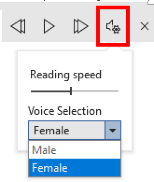
then select the Read Aloud button. A small toolbar will appear in the document, and
Word will start reading aloud from the caret’s current position (at the star to “Orb” in the graphic below).
You can select your voice by clicking the drop-down menu of the toolbar:
The voice sounds like what it is: a computer reading the text. It’s far from perfect, but you will notice things you may have missed otherwise as you read along with the spoken word.
 Manatee Writers
Leave a comment